It was supposed to be a quick weekend project. You know the kind: “I’ll just spin up an egress VM, route some traffic through it, sip my coffee, and be done by lunch.” Reader, I was not done by lunch.
The Setup
I was building a small access tier for some dev environments: an egress VM with Cloudflare Zero Trust in front of it, hostname-based routing for two specific dev domains, and AWS WAF on the other side checking the source IP. Pretty standard “give my team secure access without exposing things to the public internet” stuff.
Everything went smoothly until I hit the part where you need to enable TLS decryption. This is the magic that lets Cloudflare’s gateway actually inspect traffic and route it based on hostname rather than just IP. Without it, your beautiful hostname rules sit there looking pretty and doing absolutely nothing.
The Tutorial Trail
I followed the official Cloudflare learning path. I followed three different blog posts. I followed the YouTube tutorial from someone whose voice sounded like they really wanted me to subscribe. They all said the same thing:
Go to Zero Trust > Settings > Network > Firewall > TLS decryption and flip the switch.
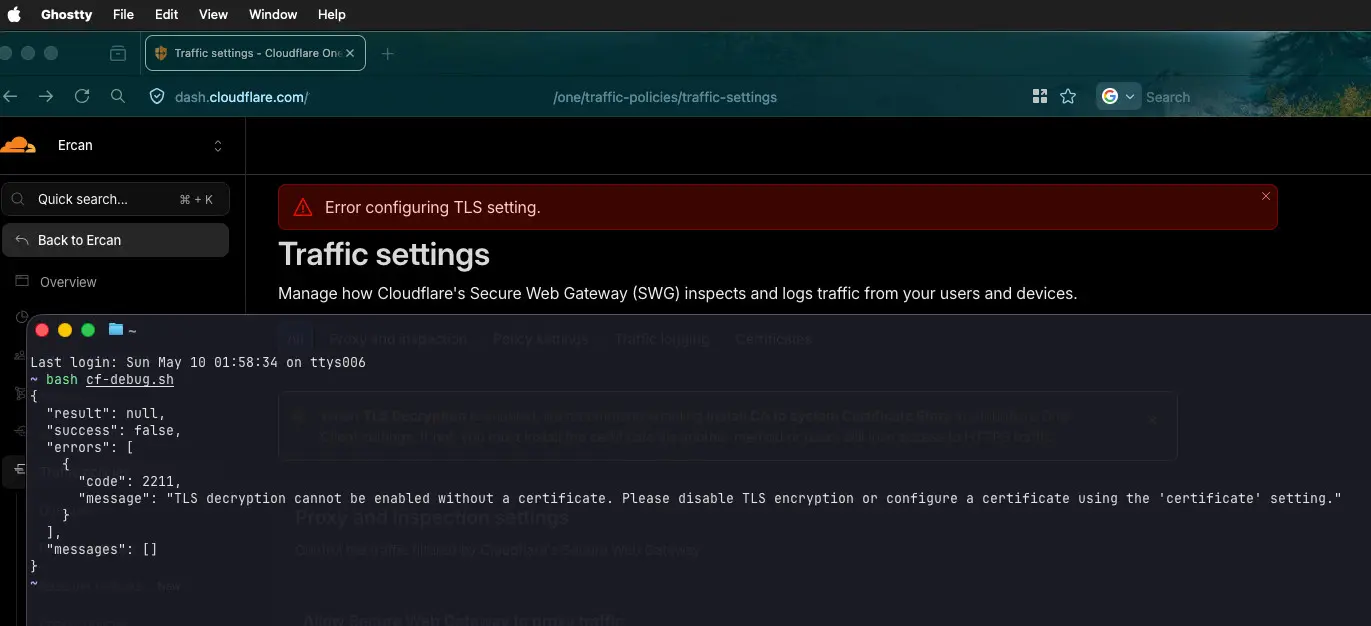
So I went there. The switch flipped. Then a red banner appeared at the top of the screen that simply said:
Error configuring TLS setting.
That was it. No code. No hint. No “click here for details” link. Just a vibe of “something went wrong, good luck.”
I tried again. Same error. I refreshed. Same error. I tried in Firefox. Same error. I cleared the cache. Same error. I considered making coffee. Made coffee. Same error.
The Detective Work
Here is where my favorite tool comes in. When the UI refuses to tell you what is wrong, the network tab and curl will. I opened developer tools, watched the request that the toggle was sending, copied it as curl, and ran it locally:
{
  "result": null,
  "success": false,
  "errors": [
    {
      "code": 2211,
      "message": "TLS decryption cannot be enabled without a certificate. Please disable TLS encryption or configure a certificate using the 'certificate' setting."
    }
  ],
  "messages": []
}
There it was. A clear, helpful, actionable error message. The kind of message that, if shown in the UI, would have saved me about ninety minutes of my life. Instead it was hiding inside the JSON response, swallowed somewhere between the API and the screen.
The message basically said: “you need a certificate first, you absolute potato.” (I am paraphrasing.)
The Real Fix
Here is the thing nobody on the internet seems to mention: the certificate management has moved.
Every guide I read pointed to the old location. The actual current location is buried in a different section entirely. Specifically:
Zero Trust > Traffic policies > Traffic settings > Certificates (tab at the top)Not Network. Not Firewall. Traffic policies > Traffic settings.
You generate a Cloudflare-managed certificate there. Then you mark it as Available and In-Use. Then you wait five to ten minutes (this part also nobody mentions, you just watch a status field and quietly question your life choices). Once the certificate is fully active, you can finally go back and enable TLS decryption.
It just works. The toggle flips. The red banner stays away. The world makes sense again.
The Moral
Two things stuck with me from this little adventure.
First: the docs were not wrong, they were just out of date. Cloudflare moves fast and reorganizes their dashboard often. This is not a complaint, just a reality. When following any guide for any rapidly evolving product, expect that the menu paths might have shifted. The concepts are the same, the buttons are not always where the screenshots say they are.
Second: the network tab is your best friend. When a UI gives you a useless error, the API almost always knows more. Browser dev tools, curl, or even just reading the raw response is the difference between debugging in five minutes and debugging in five hours. UI error handling is a thin layer painted over a much more verbose system, and that system is usually right there waiting for you to ask it nicely.
The Bonus
I did report this to Cloudflare. The error code 2211 has a perfectly good message attached to it. It just is not making it to the screen. Hopefully someone catches it and a future weekend warrior gets a helpful banner instead of a vague one.
Until then, if you ever see “Error configuring TLS setting” with no further detail, the answer is probably:
- Generate a certificate first (under Traffic policies > Traffic settings)
- Mark it Available and In-Use
- Wait
- Then enable TLS decryption
Now if you will excuse me, I have an egress VM that finally works, and a coffee that has gone cold twice.
Cheers from the Sunday mid-night (02:42 AM) debugging desk.